

Download APK PER33 Ultra Chart Watch Face Latest Version
| Developer: | Latest Version: | Update Date: |
|---|---|---|
| PERSONA Watch Face. | 17/09/2026 |
Download APK PER33 Ultra Chart Watch Face Latest Version Install APK
Downloading
Downloading Download APK PER33 Ultra Chart Watch Face Latest Version com.watchfacestudio.per33.apk






⚡PER33 Ultra Chart Watch Face
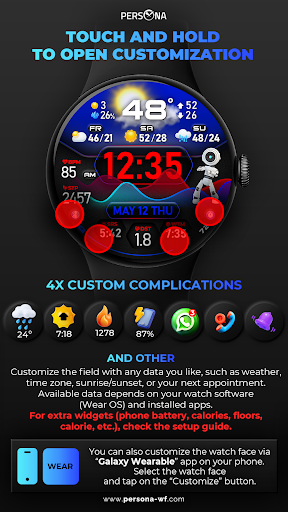
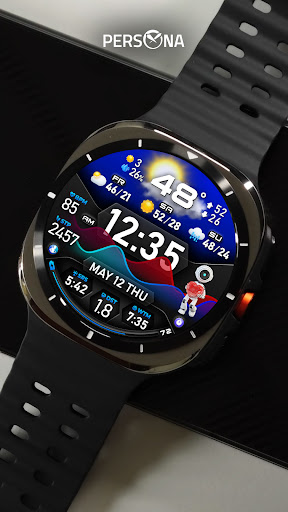
Transform your smartwatch into a masterpiece! 🎨 With 3D weather animations, 10 robot styles, and endless color combinations, create a watch face that's truly yours. Stay connected with detailed metrics like weather, steps, and heart rate—all at a glance! ⌚
🎨 Customize your PER33 Ultra Chart Watch Face
3D Realistic weather animation
10 Robot animations
10 Backgrounds
10 Sky designs
20 Color combinations
10 AOD Dims
2 Custom complications
2 Custom app shortcuts
⌚ Features of PER33 Ultra Chart Watch Face
Weather type and temperature (°F / °C)
High & Low temperature (°F / °C)
Next 3 days' weather type
Next 3 days' temperature (°F / °C)
Steps, daily goal & distance (KM / Miles)
Phone & watch battery level
Active burned calories, floors
Heart rate monitor
UV index, rain possibility
Moon phase, sunset/sunrise
Time zone, barometer
Next appointment reminder
Always-On display with adjustable colors
🛠️ Easy Customization Mode
Simply touch and hold to personalize what data you see — weather, sunrise/sunset, time zone, and more.
🔋 For extra complications and widgets like phone battery, calories, or floors, please check the setup guide here:
👉 https://persona-wf.com/installation/
❓ Weather Not Updating?
Seeing a “❓” icon? That means your watch can’t get weather data. Check your internet connection and refresh the watch face.
🌙 Always-On Display (AOD)
The watch face has an always-active display. You can change the brightness level in the customization menu. There are 10 levels in total.
The colors are synchronized with the normal view.
With the new option “AOD Dim” in the customization menu, you can now change the AOD layout.
🌐 More Details:
https://persona-wf.com/portfolios/per33/
📖 Installation Guide
Before leaving a review, make sure to check the installation guide and FAQ for a smooth experience:
👉 https://persona-wf.com/installation/
⌚ Supported Devices
Compatible with all Wear OS devices (API Level 35+), including:
SAMSUNG: Galaxy Watch Ultra 2 - Ultra, Watch 9 - 8 - 7 - 6 - 5 - 4 (Classic & FE)
GOOGLE: Pixel Watch 5 - 4 - 3 - 2 - 1
ONEPLUS / OPPO: OnePlus Watch 4 - 3 - 2R - 2, OPPO Watch X3 - X2 - X
XIAOMI: Watch 5 - 2 Pro - 2
FITBIT: Fitbit Ace LTE
🚀 Exceptional Support
Need assistance? We’re here for you
📩 [email protected]
💜 Join Our Community
Get the latest designs & exclusive offers
🌐 https://persona-wf.com
📩 Newsletter
https://persona-wf.com/register
👍 Facebook
https://www.facebook.com/Persona-Watch-Face
📸 Instagram
https://www.instagram.com/persona_watch_face
💬 Telegram
https://t.me/persona_watchface
▶️ YouTube
https://www.youtube.com/c/PersonaWatchFace
💖💖💖 Thank You for Choosing PERSONA!
We hope our design brightens your day and your wrist 😊
Designed with love by Ayla GOKMEN
More
What's new
• Major UI overhaul with enhanced readability and vibrant color schemes
• Expanded color options and custom slot enhancements
• Redesigned Always-On Display for maximum visibility and style
• Updated with the latest Watch Face Format (WFF) for smoother animations
• Critical system updates for better compatibility and performance
• Expanded color options and custom slot enhancements
• Redesigned Always-On Display for maximum visibility and style
• Updated with the latest Watch Face Format (WFF) for smoother animations
• Critical system updates for better compatibility and performance
