

Download APK G-Stomper Studio Demo: DAW Latest Version
| Developer: | Latest Version: | Update Date: |
|---|---|---|
| planet-h.com. | 6.2.3.3 | 01/11/2026 |
Download APK G-Stomper Studio Demo: DAW Latest Version Install APK
Downloading
Downloading Download APK G-Stomper Studio Demo: DAW Latest Version com.planeth.gstomperdemo.apk


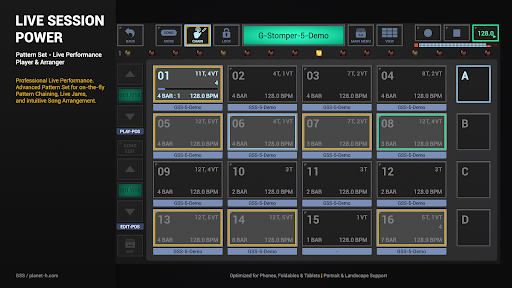


G-Stomper Studio Demo: Live Performance DAW & Groovebox
This is the demo version of G-Stomper Studio, provided for you to verify the app's compatibility and performance on your specific hardware before purchasing the full version.
G-Stomper Studio is a professional Music Production Tool, highly optimized for electronic live performances. It is a feature-packed, pattern-based Groovebox and Digital Audio Workstation, a powerful Drum Machine/Sampler, a Virtual Analog Synth (VA-Beast), and many other creative features for your live session as well as for your studio quality production.
Demo Version Limitations:
The Demo is fully featured, but with the following limitations:
• Track Count: 12 Sampler Tracks, 5 Synthesizer Tracks
• Save/Load: In the Audio Editor/Recorder, saving is disabled. In all other modules, you can save your work, but loading is disabled (except for auto-saved files).
• Recording & Export: Real-time recording of your Live Sessions (Audio Session Recorder) is disabled. Audio Export is limited to 8-bit Sum-Export of a single Pattern.
• Full Version Compatibility: Once you get the full version, you will be able to load all your work saved in the demo.
Pro-Grade Instrument Suite:
• Drum Machine: Sample-based Drum Machine and Sampler, max 24 Tracks (12 in Demo)
• Sampler Track Grid: Grid-based multi-track step sequencer, max 24 Tracks
• Sampler Note Grid: Monophonic melodic step sequencer, max 24 Tracks
• Sampler Drum Pads: 24 Drum Pads for expressive live playing
• VA-Beast Synthesizer: Polyphonic Virtual Analog Performance Synth with FM and PCM engines
• VA-Beast Poly Grid: Polyphonic step sequencer, max 12 Tracks (5 in Demo)
• Full MIDI Support: Round-trip MIDI (IN/OUT) via USB (host+peripheral) or Bluetooth LE (host/on Android 12+)
• Ableton Link: Play in sync with any Link-enabled app, Ableton Live, and Link-enabled hardware over WiFi
Mixer and Effects:
• Line Mixer: Up to 36 Channels (17 in Demo), Parametric 3-band EQ + 2 Insert Effect Units per Channel
• Effect Rack: 3 chainable effect units for group processing
• Master Section: Master Out, Parametric 3-band EQ, 2 Insert Effect Units
• 47 Effect Types: High-quality dynamic processors, resonant filters, distortions, delays, reverbs, vocoders, and more
• Effect Features: Side Chain Support, Tempo synced LFOs/delays, and Envelope Followers
Sequencing and Arrangement:
• Pattern Set: Live Pattern/Song Arranger with 64 concurrent patterns
• Timing & Measure: Swing quantization, time signature, and measure per Pattern
• Advanced Automation: Full motion sequencing and automation support
Feature Highlights:
• High Quality Audio Engine: 32bit float DSP algorithms
• User Sample Support: WAV and AIFF up to 64bit, MP3, OGG, FLAC
• Tablet optimized with Landscape and Portrait mode support
• Audio Editor: Graphical Sample Editor and Recorder
Support:
FAQ: https://www.planet-h.com/faq/
Forum: https://www.planet-h.com/gstomperbb/
Manual: https://www.planet-h.com/documentation/
Minimum device specs:
1.5 GHz Octa-core CPU, 1024 * 768 screen resolution
Recommended device specs:
2.4 GHz Octa-core or faster CPU, 1920 * 1080 or higher screen resolution
Permissions:
Bluetooth Connectivity: MIDI over BLE
Microphone Access: Audio Sample Recorder
Local Network Access: Ableton Link Synchronization
Foreground Service for Media Playback & Notification: Once activated by the user (via Stop-Lock), this is required to keep the audio engine running and playback active while the app is in the background or the screen is locked.
More
What's new
• Overhauled Portrait Mode with new dynamic screen ratio support!
• Introduces a new 2-View Portrait Layout alongside the classic 3-View stacked layout
• Dynamic Auto-Switching: Adapts automatically for optimal screen fit (ideal for foldables when unfolded)
• New Setting (SETUP > UI > Portrait Layout Preference): Choose between "Dynamic 2/3-View Layout (best fit)" or "Always force 3-View Layout"
https://www.planet-h.com/g-stomper-studio/gst-whats-new/
• Introduces a new 2-View Portrait Layout alongside the classic 3-View stacked layout
• Dynamic Auto-Switching: Adapts automatically for optimal screen fit (ideal for foldables when unfolded)
• New Setting (SETUP > UI > Portrait Layout Preference): Choose between "Dynamic 2/3-View Layout (best fit)" or "Always force 3-View Layout"
https://www.planet-h.com/g-stomper-studio/gst-whats-new/
