
Download APK App Shortcuts On LockScreen Latest Version
| Developer: | Latest Version: | Update Date: |
|---|---|---|
| GoNext . | 01/01/1970 |








🔓Instantly access your most-used apps, tools, and notes directly from your lock screen – save time, stay productive, and simplify your daily tasks.
This app helps you quickly open your important apps from the lock screen. You just unlock and use them right away — no need to search inside your phone. For Quick text or note down use Notes and Canvas directly on the lock screen without unlocking. You can also schedule apps for different times and also you can set gestures to open apps. Everything you need is ready and easy to reach.
⚡ Key Features:
✅ Actionable Apps Quickly open essential apps like Calculator, Calendar, Clock, Files, Messages, Settings, etc. Add them to your lock screen from this app and access them instantly — no need to search inside your phone.
✅ Scheduled Apps Balance productivity and social time with smart scheduling. Show productive apps on your lock screen during work hours (like for an example, 10:00 AM to 4:00 PM) and social apps in the evening. Customize the schedule your way.
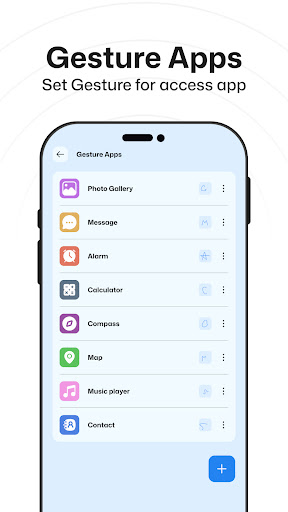
✅ Gesture Apps Assign gestures to your favorite apps. Just draw the gesture from lock screen Gesture button and instantly launch that app.
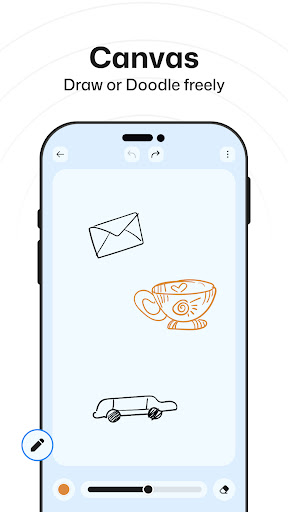
✅ Canvas Draw, doodle, sketch, or note down ideas freely on a canvas from lock screen Canvas button. Save your creativity or thoughts anytime.
✅ Notes Write and save important notes quickly. These notes appear right on your lock screen so you never miss or forget anything — perfect for reminders, to-dos, or quick thoughts.
🎯 Highlights:
- Open your important apps right after unlocking, no need to search.
- Set different apps to show at different times of the day.
- Use gestures to quickly open your favorite apps.
- Write a quick note and keep it on your lock screen so you don’t forget.
- Sketch something on the screen whenever you want.
Permission:
Overlay Permission: Allow this permission to show app shortcuts & other features as a overlay on lock screen.
More
This app helps you quickly open your important apps from the lock screen. You just unlock and use them right away — no need to search inside your phone. For Quick text or note down use Notes and Canvas directly on the lock screen without unlocking. You can also schedule apps for different times and also you can set gestures to open apps. Everything you need is ready and easy to reach.
⚡ Key Features:
✅ Actionable Apps Quickly open essential apps like Calculator, Calendar, Clock, Files, Messages, Settings, etc. Add them to your lock screen from this app and access them instantly — no need to search inside your phone.
✅ Scheduled Apps Balance productivity and social time with smart scheduling. Show productive apps on your lock screen during work hours (like for an example, 10:00 AM to 4:00 PM) and social apps in the evening. Customize the schedule your way.
✅ Gesture Apps Assign gestures to your favorite apps. Just draw the gesture from lock screen Gesture button and instantly launch that app.
✅ Canvas Draw, doodle, sketch, or note down ideas freely on a canvas from lock screen Canvas button. Save your creativity or thoughts anytime.
✅ Notes Write and save important notes quickly. These notes appear right on your lock screen so you never miss or forget anything — perfect for reminders, to-dos, or quick thoughts.
🎯 Highlights:
- Open your important apps right after unlocking, no need to search.
- Set different apps to show at different times of the day.
- Use gestures to quickly open your favorite apps.
- Write a quick note and keep it on your lock screen so you don’t forget.
- Sketch something on the screen whenever you want.
Permission:
Overlay Permission: Allow this permission to show app shortcuts & other features as a overlay on lock screen.
What's new
Category:
Get it on:

Size:
Packet Name:
com.gonext.appshortcutlockscreen
Android Version:
Publish Date:
09/04/2025
Report:
App Shortcuts On LockScreen Install APK