

Download APK Orca Scan - Barcode Scanner Latest Version
| Developer: | Latest Version: | Update Date: |
|---|---|---|
| Cambridge App Lab . | 11.15.4 | 25/06/2024 |


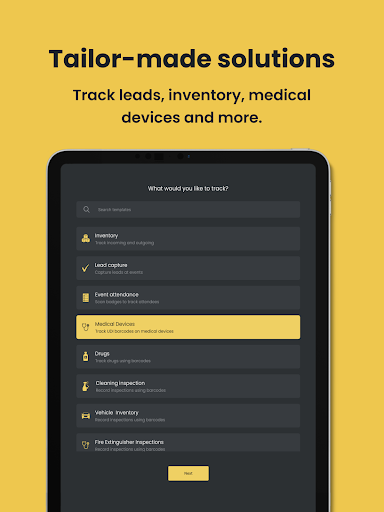




Orca Scan is a GS1 Approved barcode scanner app designed to make it as easy as possible to track assets and inventory using your smartphone.
It is fully configurable; simply add/remove fields to capture the data you want, then export in various formats - including Microsoft Excel, JSON, XML, CSV or edit via your online account.
HOW IT WORKS:
1. Scan any barcode, QR code, UPC, GS1 etc
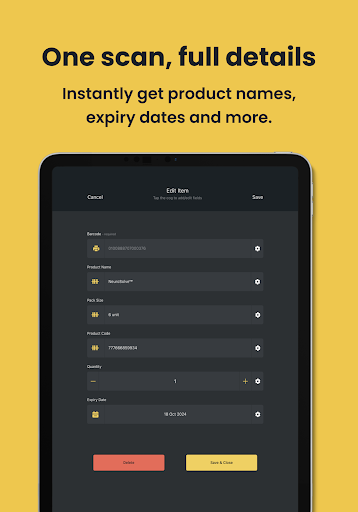
2. Add details such as quantity, description, GPS location
3. Add custom fields to capture additional data
4. Share data in a Microsoft Excel spreadsheet, CSV, JSON
HOW OTHERS USE ORCA SCAN:
- Scan EAN/UPC barcodes for inventory tracking
- Scan FMD barcodes on prescription drugs
- Scan UDI barcodes to track medical devices
- Self-check-in at events using the front-facing camera
- Scan Fire Extinguisher barcodes to record inspections
- Record Preventive Maintenance Checks
- Scan VIN barcodes to track vehicles
- Generate and print barcodes to track office equipment
- Scan ISBN barcodes to catalogue books
ADD CUSTOM FIELDS:
- Text
- Date
- Time
- Date (automatic)
- Date Time
- Date Time (automatic)
- Drop-Down List
- Email
- GPS Location
- GPS Location (automatic)
- Number
- Number (auto-increase on scan)
- Number (auto-decrease on scan)
- Signature
- True/False
- Unique ID
SCAN ANY BARCODE:
- QR Code
- GS1 128
- Data Matrix
- Aztec
- Universal Product Codes (UPC) E & A
- European Article Number (EAN) 8 and 13
- Code 39, Code 93 & Code 128
- PDF417
- Interleaved Two of Five (ITF)
Over 150k people worldwide have contributed feedback to help evolve Orca Scan into the leading barcode scanner app. Feel free to share your crazy ideas -> [email protected]
Terms of Service -> https://orcascan.com/terms
Privacy Policy -> https://orcascan.com/privacy
More
It is fully configurable; simply add/remove fields to capture the data you want, then export in various formats - including Microsoft Excel, JSON, XML, CSV or edit via your online account.
HOW IT WORKS:
1. Scan any barcode, QR code, UPC, GS1 etc
2. Add details such as quantity, description, GPS location
3. Add custom fields to capture additional data
4. Share data in a Microsoft Excel spreadsheet, CSV, JSON
HOW OTHERS USE ORCA SCAN:
- Scan EAN/UPC barcodes for inventory tracking
- Scan FMD barcodes on prescription drugs
- Scan UDI barcodes to track medical devices
- Self-check-in at events using the front-facing camera
- Scan Fire Extinguisher barcodes to record inspections
- Record Preventive Maintenance Checks
- Scan VIN barcodes to track vehicles
- Generate and print barcodes to track office equipment
- Scan ISBN barcodes to catalogue books
ADD CUSTOM FIELDS:
- Text
- Date
- Time
- Date (automatic)
- Date Time
- Date Time (automatic)
- Drop-Down List
- GPS Location
- GPS Location (automatic)
- Number
- Number (auto-increase on scan)
- Number (auto-decrease on scan)
- Signature
- True/False
- Unique ID
SCAN ANY BARCODE:
- QR Code
- GS1 128
- Data Matrix
- Aztec
- Universal Product Codes (UPC) E & A
- European Article Number (EAN) 8 and 13
- Code 39, Code 93 & Code 128
- PDF417
- Interleaved Two of Five (ITF)
Over 150k people worldwide have contributed feedback to help evolve Orca Scan into the leading barcode scanner app. Feel free to share your crazy ideas -> [email protected]
Terms of Service -> https://orcascan.com/terms
Privacy Policy -> https://orcascan.com/privacy
What's new
What's new this week?
Smooth Scanning: We fixed the scanner, so no more crashes when you scan an empty barcode.
Easy Navigation: Fixed it! The scrollbar is now visible on sheet creation.
Clear Inputs: We made some cosmetic tweaks to the verification screen.
For all the details, or to make a feature request, check out our changelog!
Smooth Scanning: We fixed the scanner, so no more crashes when you scan an empty barcode.
Easy Navigation: Fixed it! The scrollbar is now visible on sheet creation.
Clear Inputs: We made some cosmetic tweaks to the verification screen.
For all the details, or to make a feature request, check out our changelog!
Category:
Get it on:

Size:
Packet Name:
com.orcascan.bulkbarcodescanner
Android Version:
5.1
Publish Date:
20/12/2017
Report:
Orca Scan - Barcode Scanner Install APK