
डाउनलोड APK Control Center: Icons & Themes नवीनतम संस्करण
| Uploaded by: | नवीनतम संस्करण: | प्रकाशन तिथि: |
|---|---|---|
| TOMODEV JSC. | 1.0.0 | 01/01/1970 |


🎨 Control Center: Icons & Themes – Customize Your Phone Your Way
Tired of your boring default screen? Ready to make your device truly yours? Personalize your phone with Control Center: Icons & Themes!
Explore a personalization app featuring 800+ Control Center themes, aesthetic wallpapers, and custom app icon packs. Create a coordinated phone theme or build your own DIY setup by mixing and matching different styles. Control Center: Icons & Themes gives you flexible ways to personalize your phone and express your style.
🔥 KEY FEATURES:
🎛️ 800+ Control Center Themes
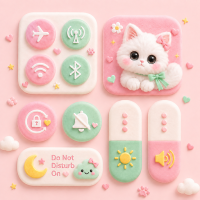
Explore a wide selection of custom control panel designs. From anime and minimal UI to glowing neon, sport, and cute aesthetics - preview and apply a style that matches your daily mood.
✨ Aesthetic App Icon Changer
Say goodbye to ugly default icons! Refresh your custom home screen with trending icon packs. Easily create custom app shortcuts that blend with your wallpaper and overall phone style.
🌈 Coordinated Theme Packs
Don’t want to design from scratch? Apply ready-made phone themes with matching app icons, wallpapers, and Control Center styles. Choose a coordinated look that makes it easier to personalize your phone with a consistent aesthetic.
🖼️ Static & Live Wallpapers
Browse a collection of static and live wallpapers in different styles. Preview your favorite designs and set them for your home screen, lock screen, or both.
🛠️ DIY Theme Maker
Create your own phone theme using photos from your gallery. Customize app shortcuts, wallpapers, and Control Center backgrounds, then adjust colors, visual details, and layouts to match your style.
⚙️ Custom Quick Settings Layout
Personalize your Control Center layout with shortcuts for apps and everyday functions. Arrange icons and controls in a way that matches how you use your phone.
↕️ Custom Swipe Gestures
You are in complete control. Choose whether your custom Control Center opens from the top, bottom, left, or right edge. Adjust the trigger position, size, color, transparency, and haptic feedback to match your habits.
Whether you love a simple vibe, a colorful aesthetic, or a dreamy, Control Center: Icons & Themes makes building your dream phone setup easy and fun.
🚀 Download Control Center: Icons & Themes and start designing a phone style that feels uniquely yours!
🔒 Permission & Privacy Information
Custom app icons are applied through home screen shortcuts. Appearance may vary slightly depending on your launcher, device, or Android version.
Accessibility Service API: This permission is used to support the custom Control Center overlay and perform user-requested quick actions and device shortcuts. Accessibility actions occur only when you interact with the Control Center or select a related feature.
The Accessibility Service does not read screen content, track user activity, or collect, store, or share personal or sensitive data.
Additional permissions:
• Display over other apps - show the Control Center overlay.
• Set wallpaper - apply wallpapers.
• Media access - use your photos for customization.
• Notifications - support Control Center status features.
Additional Android permissions may be requested only when you enable specific related quick controls (e.g., Camera for flashlight). You can easily review and manage these in your device settings.
अधिक
Tired of your boring default screen? Ready to make your device truly yours? Personalize your phone with Control Center: Icons & Themes!
Explore a personalization app featuring 800+ Control Center themes, aesthetic wallpapers, and custom app icon packs. Create a coordinated phone theme or build your own DIY setup by mixing and matching different styles. Control Center: Icons & Themes gives you flexible ways to personalize your phone and express your style.
🔥 KEY FEATURES:
🎛️ 800+ Control Center Themes
Explore a wide selection of custom control panel designs. From anime and minimal UI to glowing neon, sport, and cute aesthetics - preview and apply a style that matches your daily mood.
✨ Aesthetic App Icon Changer
Say goodbye to ugly default icons! Refresh your custom home screen with trending icon packs. Easily create custom app shortcuts that blend with your wallpaper and overall phone style.
🌈 Coordinated Theme Packs
Don’t want to design from scratch? Apply ready-made phone themes with matching app icons, wallpapers, and Control Center styles. Choose a coordinated look that makes it easier to personalize your phone with a consistent aesthetic.
🖼️ Static & Live Wallpapers
Browse a collection of static and live wallpapers in different styles. Preview your favorite designs and set them for your home screen, lock screen, or both.
🛠️ DIY Theme Maker
Create your own phone theme using photos from your gallery. Customize app shortcuts, wallpapers, and Control Center backgrounds, then adjust colors, visual details, and layouts to match your style.
⚙️ Custom Quick Settings Layout
Personalize your Control Center layout with shortcuts for apps and everyday functions. Arrange icons and controls in a way that matches how you use your phone.
↕️ Custom Swipe Gestures
You are in complete control. Choose whether your custom Control Center opens from the top, bottom, left, or right edge. Adjust the trigger position, size, color, transparency, and haptic feedback to match your habits.
Whether you love a simple vibe, a colorful aesthetic, or a dreamy, Control Center: Icons & Themes makes building your dream phone setup easy and fun.
🚀 Download Control Center: Icons & Themes and start designing a phone style that feels uniquely yours!
🔒 Permission & Privacy Information
Custom app icons are applied through home screen shortcuts. Appearance may vary slightly depending on your launcher, device, or Android version.
Accessibility Service API: This permission is used to support the custom Control Center overlay and perform user-requested quick actions and device shortcuts. Accessibility actions occur only when you interact with the Control Center or select a related feature.
The Accessibility Service does not read screen content, track user activity, or collect, store, or share personal or sensitive data.
Additional permissions:
• Display over other apps - show the Control Center overlay.
• Set wallpaper - apply wallpapers.
• Media access - use your photos for customization.
• Notifications - support Control Center status features.
Additional Android permissions may be requested only when you enable specific related quick controls (e.g., Camera for flashlight). You can easily review and manage these in your device settings.
What's new
First build release
श्रेणी:
Get it on:

Size:
Packet Name:
com.themekit.controlcenter.wallpaper.appicons
Android Version:
8.0
Publish Date:
22/08/2026
Report:
Control Center: Icons & Themes